Beginner guidecomma fourcomma 3X

Your first drive with openpilot: calibration and the screen

Mount it, drive a few minutes so it calibrates, then engage with your cruise button. Here is what the screen means along the way.

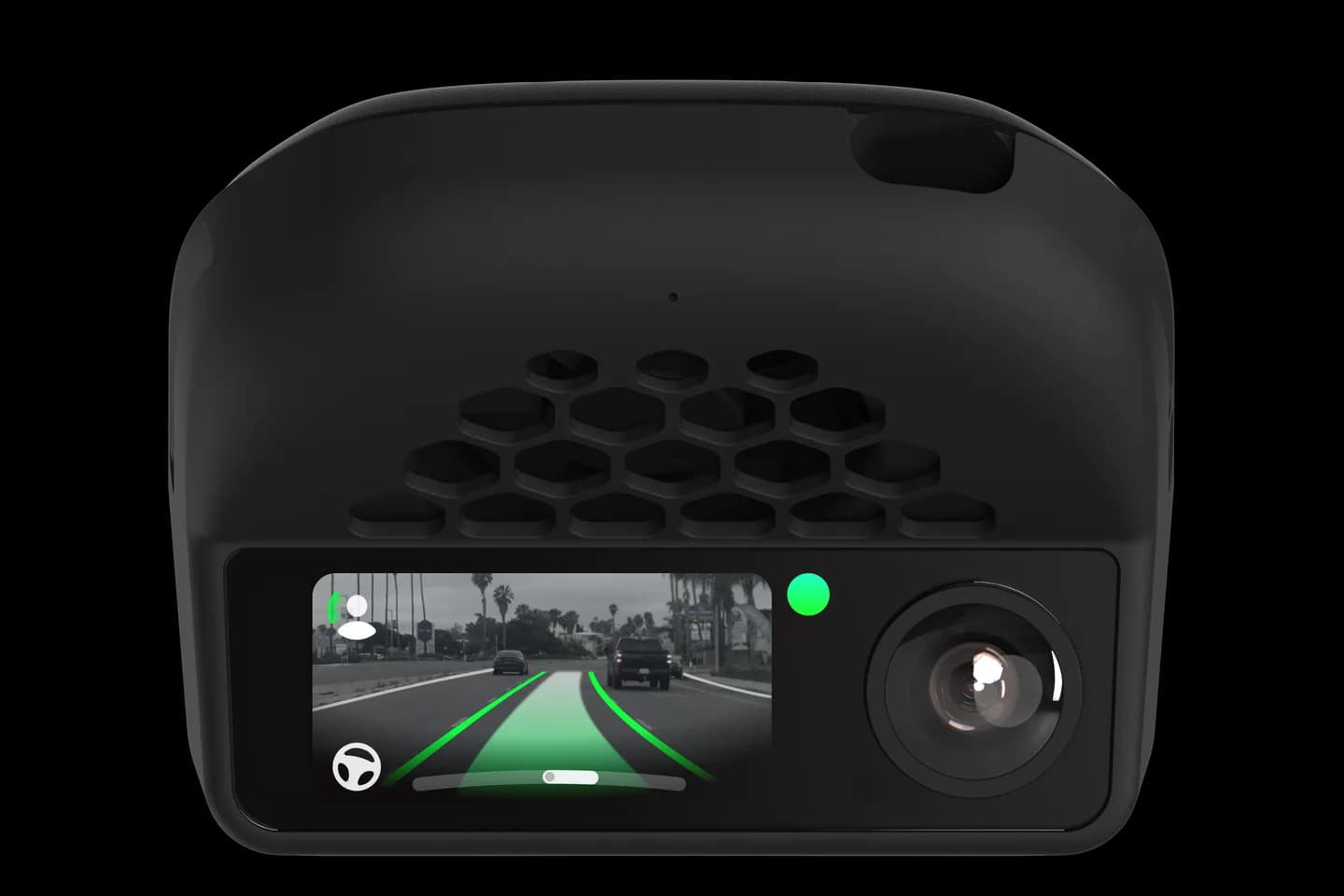
comma four with its screen on
15 mphminimum speed for calibrationabout 24 km/h
20 mphminimum speed for a lane changeabout 32 km/h
3 daysfree drive storage in comma connect

First few minutes

Calibration

openpilot learns how the device is angled. Until then it will not engage.

  1. Drive normally above 15 mph

    The screen says Calibrating with a percentage. Only straight driving above 15 mph, about 24 km/h, counts.

  2. Expect it to finish in minutes

    About 25 seconds of straight, steady driving is enough. The time need not be in one go.

  3. Engage once it reaches 100%

    Turn on cruise control as usual. openpilot takes over after a sound, and the screen changes colour.

  4. Remount if it says Calibration Invalid

    The device must point straight ahead and sit level. Move the mount to the centre and try again.

Reading the screen

What the screen shows

The two devices show the same information in different ways.

comma four

  • Grey lane lines: not engaged. Green: engaged. White: you are steering.
  • The steering wheel icon appears only when engaged and turns with the wheel.
  • The ball on the right rises and turns green as confidence goes up.
  • The steering arc grows as openpilot nears its limit.

comma 3X

  • Blue border: not engaged. Green: engaged. Grey: you are overriding.
  • White lines are lane lines; red lines are road edges.
  • MAX shows your set speed and turns green when engaged.
  • The face icon shows green arcs when the camera sees you.

Changing lanes

How a lane change works

  1. Be above 20 mph, about 32 km/h

    Below that speed openpilot will not change lanes for you.

  2. Turn on one signal and check your mirror

    openpilot cannot see beside you. You confirm the lane is clear.

  3. Nudge the wheel toward the signal

    The screen says Steer Left or Steer Right to Start Lane Change Once Safe. A small nudge starts it.

  4. Let it finish, or cancel the signal

    Cancelling the signal stops the move. If nothing happens within ten seconds, it gives up.

Driver monitoring

Keep your eyes on the road

The camera above the screen watches your eyes. You never need to touch the wheel to prove attention.

What the warnings mean

  • Pay Attention: you looked away for a few seconds.
  • Driver Distracted, with a sound: look back now.
  • DISENGAGE IMMEDIATELY: openpilot is about to stop steering.
  • No Face Detected: adjust the mount or remove sunglasses that block it.

On the comma four

The face icon turns orange as soon as a countdown starts and green again when you look back. Three ignored warnings lock openpilot out until you restart the car.

Two modes

Chill mode and Experimental mode

openpilot starts in chill mode. Learn that first.

Chill mode, the default

openpilot steers. Speed follows your set speed and the car ahead, or your car's own cruise on some models. The path on screen is green when it may speed up.

Experimental mode

The driving model controls gas and brakes and can stop for lights and stop signs. comma calls it alpha and expects mistakes, so keep your foot ready.

Common messages

Messages you will see in the first week

Press Resume to Exit Standstill

The car stopped and will not creep on its own. Tap resume on the wheel.

Take Control, Turn Exceeds Steering Limit

The bend is sharper than openpilot can steer. Steer through it yourself.

Steer Assist Unavailable Below a speed

Your car's steering only helps above that speed. It is a car limit, not a fault.

Door Open, Seatbelt Unlatched, Gear not D

openpilot refuses to engage until the car is ready to drive.

BRAKE! Risk of Collision

The car's own emergency braking is warning. Brake now.

Quick answers

Questions new drivers ask

How long does calibration take?

Usually a few minutes of normal driving. It only counts straight driving above 15 mph, so town traffic takes longer.

What does the green mean?

Green means engaged. On the comma 3X the border turns green; on the comma four the two nearest lane lines turn green.

Why did it say Pay Attention?

The driver camera saw you look away. Warnings escalate after roughly 3, 5, and 11 seconds, then openpilot disengages.

Does it resume after a full stop?

On most listed cars, yes. On the others the screen says Press Resume to Exit Standstill and you tap resume.

Should I turn on Experimental mode?

Not on day one. Chill mode is the default. Experimental lets the model control speed and stop for lights, and comma calls it alpha.

Sources for this guide

Speeds, timings, and message text come from openpilot 0.11.1 at one checked version, the release branch for both comma four and comma 3X on September 11, 2026. Screen colours come from the same code and comma's launch posts.

Something else on the screen?

Car Unrecognized has its own fix. Setup and community guides cover the rest.

Photos: comma.ai. CommaGuide is an independent guide and is not affiliated with comma.ai.

Was this guide helpful?