Put open-source AI in your car.
The usual route is a comma device, the correct car harness, and a supported openpilot release. You get a ready-made path into AI driving assistance, without building a computer or training your own model.
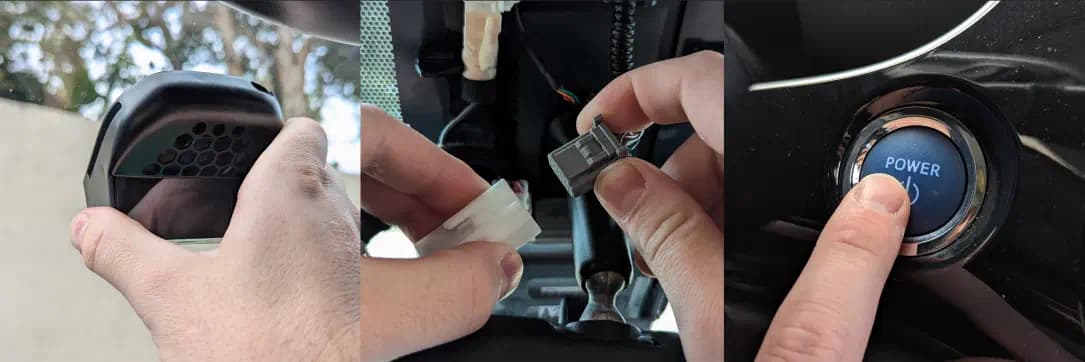
01 · Match your exact car
Check make, model, year, trim and required driver-assistance package. Read the listing’s speed-control and steering limitations before buying hardware. An unlisted configuration needs investigation, not a guess.
02 · Get the matching hardware
Choose a compatible comma device and the harness specified for the car. Check the current shop contents and any additional parts in the vehicle listing. Do not assume a cable for a similar car is interchangeable.
03 · Mount and connect while parked
Follow comma’s illustrated hardware instructions for placement, camera visibility, cable routing and the vehicle connection. Use our setup hub to find the right guide for your hardware.
04 · Install, calibrate, learn
Follow the maintained installation guide for your chosen software and device. Complete the on-device introduction and calibration, then learn the engagement and takeover controls. For a first setup, standard openpilot is a straightforward starting point; explore community options afterward.
Questions
Do I have to code or use a terminal?
The normal consumer setup uses the device’s installation flow. Our guides link to the maintained instructions; you do not need to compile openpilot yourself.
Where is the install URL?
Use the linked openpilot installation guide to get the checked URL for your device. Keeping it there avoids an outdated installer in this introduction.
Related guides
Was this guide helpful?